Aerish Logo
Aerish AcademySistem operasional sekolah yang lebih rapi
BerandaProdukFiturImplementasiPanduanKontak
IDDaftar Gratis
Menu
BerandaProdukFiturImplementasiPanduanKontak
IDDaftar Gratis
Beranda/Dokumentasi/Aerish Help Center/How To Add a Subjects

Pusat Bantuan

Aerish Help Center

Produk

Aerish Help Center

Panduan Umum

Panduan aktif

Panduan Umum

Panduan

Panduan Umum

Artikel

Cara Membuat Akun Aerish Akademi3 menitCara Menambahkan Mata Pelajaran2 menitCara Mengatur Kelas dan Kenaikan Kelas untuk Siswa Pada Website Aerish Akademi7 menitHow To Add a Subjects4 menit
Panduan UmumArtikel

How To Add a Subjects

4 menitDiperbarui 12/6/2026

In this step, you will learn how to add a course for the new academic year.

  • Click the ‘Subjects’ button on the left.

  • Then click the blue ‘Add New’ button to add a subject.

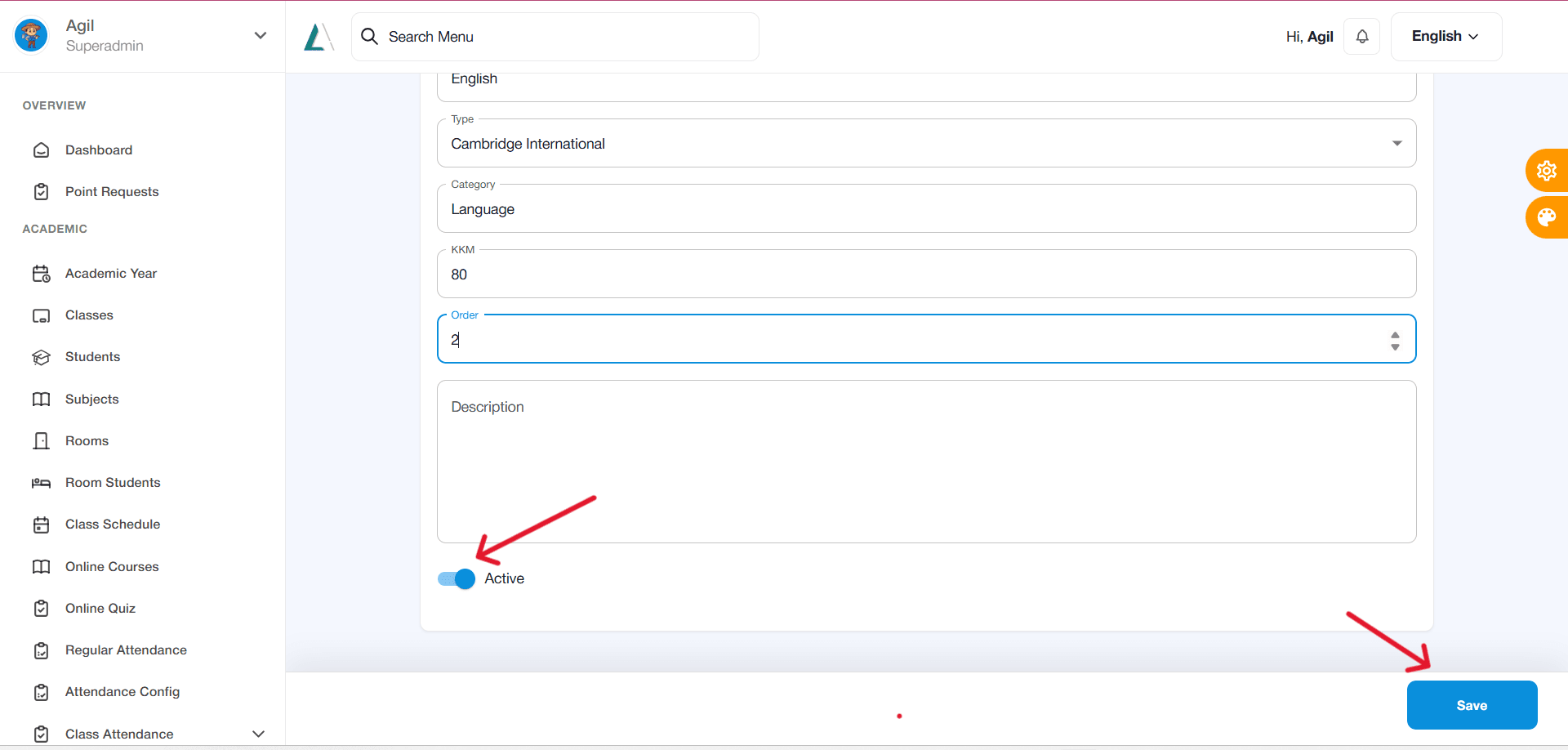
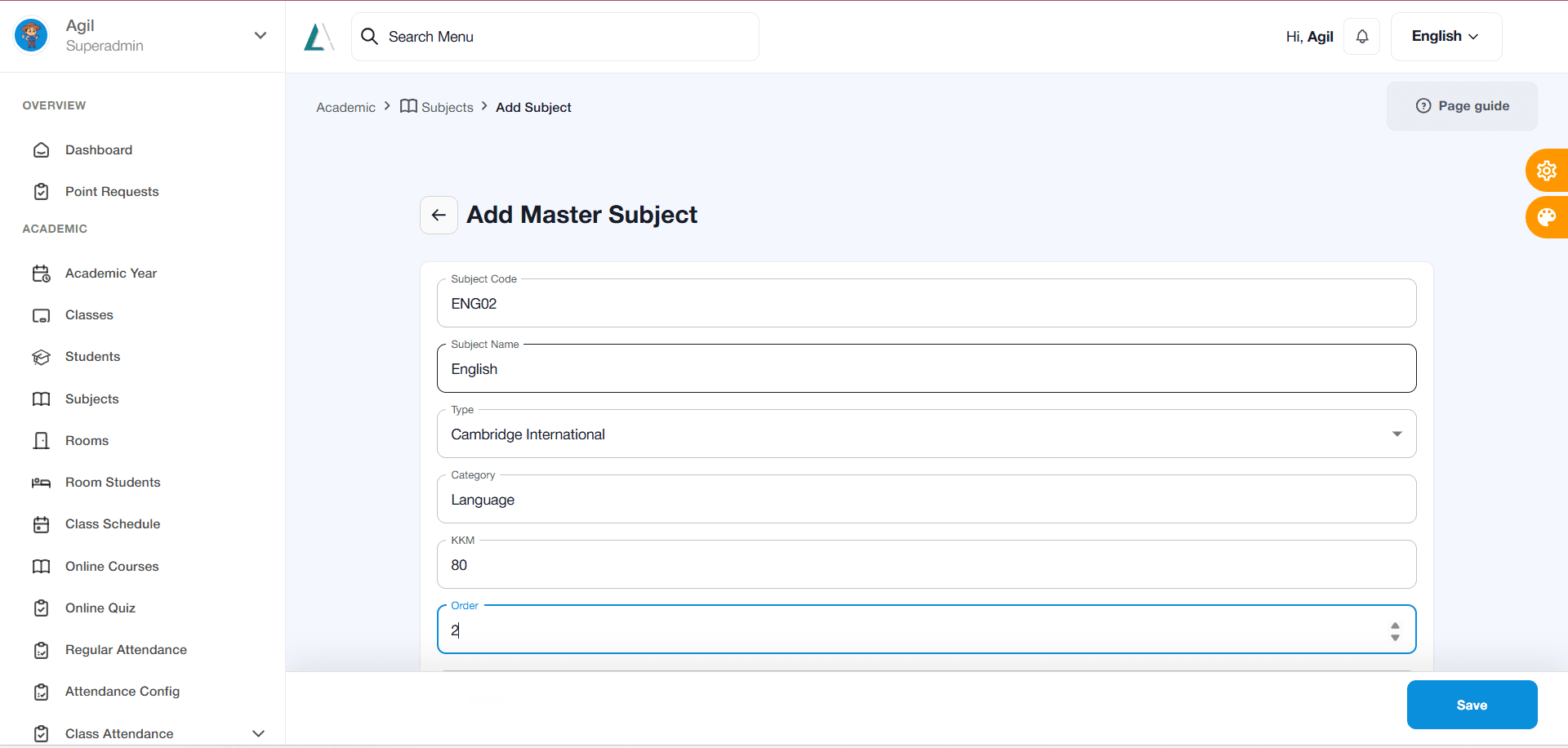
  • Fill in all fields as shown in the image below:
    How To Add a Subjects
    How To Add a Subjects
  • Enter the subject code according to the subject being added; for example, if the subject is English, use the code ‘ENG02’.

  • If the subject being added is, for example, Chemistry, create a code corresponding to the subject, such as ‘CMS02’.

  • There are no specific rules for filling in the subject code; it can be entered as the teacher prefers, provided it matches the subject being added.

  • Similarly, there are no specific rules regarding the numbers used in the subject code.

  • Next, select the curriculum type used by the institution or school.

  • Then, fill in the subject category for the added subject, such as Science, Social Studies, Language, etc.

  • Fill in the Minimum Competency Criteria (KKM) according to the institution’s or school’s standards.

  • Fill in the “Order” column only for website formalities; in the example above, simply follow the sequence of subjects already listed or registered.

  • The “Description” column may be skipped or left blank.

  • Finally, make sure to click the “Activate” button below the “Description” column to indicate that the subject can now be added by students.

  • Click the “Save” button to save

    How To Add a Subjects
    How To Add a Subjects
Isi halaman+-

Heading artikel akan muncul di sini setelah isi dokumen memakai heading.

Navigasi dokumen+-

Panduan

Panduan Umum

Artikel

Cara Membuat Akun Aerish Akademi3 menitCara Menambahkan Mata Pelajaran2 menitCara Mengatur Kelas dan Kenaikan Kelas untuk Siswa Pada Website Aerish Akademi7 menitHow To Add a Subjects4 menit

Dokumen terkait

Cara Membuat Akun Aerish Akademi

Tutorial ini dibuat untuk staff admin yang akan membantu staff sekolah dalam membuat akun pertamanya di website Aerish Academy. Ikuti langkah-langkah dibawah ini untuk membuat akun sebagai pengguna & akses pada website Aerish Academy:

Cara Menambahkan Mata Pelajaran

Pada tahap ini, akan diarahkan bagaimana cara menambahkan kelas pada tahun ajaran yang baru.

Cara Mengatur Kelas dan Kenaikan Kelas untuk Siswa Pada Website Aerish Akademi

Setelah berhasil membuat akun, langkah selanjutnya adalah mengatur kelas untuk siswa. Pada bagian ini, pastikan siswa sudah didaftarkan pada website Aerish sebagai peran “Pengguna” pada step tambah akun/buat akun.

Dokumen Sebelumnya

Cara Mengatur Kelas dan Kenaikan Kelas untuk Siswa Pada Website Aerish Akademi

Kembali ke semua panduan

Isi halaman

Pada artikel ini

Heading artikel akan muncul di sini setelah isi dokumen memakai heading.

Aerish LogoAerish Academy

Platform operasional sekolah untuk memantau akademik, keuangan, wallet, POS, HR, PSB, course, quiz, CMS, dan notifikasi dari satu workspace.

+62 811-114-113[email protected]Senin - Jumat, 08.00 - 17.00 WIB

Produk

Bukti ProdukFitur UtamaImplementasi

Legal

Terms of ServicePrivacy PolicyCookie Policy

Company

AboutCareerDocumentationWhatsAppEmail

Media Sosial

WhatsAppEmail

© 2026 aerish.com. All rights reserved.

Dikembangkan oleh Anselia