
Quran Memorization and Student Care Guide in Aerish
Track student Quran memorization and manage violations, permits, and health via Aerish Student Care.
Quran memorization (tahfidz) and student guidance sit at the heart of pesantren life, and Aerish provides dedicated modules to record memorization progress while managing pastoral care through Student Care. This guide is written for pesantren administrators, tahfidz coordinators, dormitory supervisors (musyrif), and the student affairs team responsible for tracking each student's Quran memorization progress and handling violations, permits, and health records digitally.
By digitizing memorization and guidance records, submission data, student violation points, and permit history are stored neatly and are easy to report to parents. You no longer depend on manual recitation books that are easily lost or scattered violation notes. Below is a complete walkthrough for managing Tahfidz and Student Care in the Aerish app.
Prerequisites
Before you begin, make sure the following are ready so that memorization and guidance data link to the correct student straight away:
- You have an account with access to the Tahfidz and Student Care menus (admin, tahfidz coordinator, or student affairs officer).
- Students are already registered and placed in an active class or halaqah (memorization group).
- The active academic year is set so that memorization progress is recorded in the correct period.
- Tahfidz supervisors already have accounts so they can record submissions themselves.
- Memorization targets (for example, juz per semester) and the violation-point scheme are agreed on internally.
Recording Quran Memorization Progress (Tahfidz)
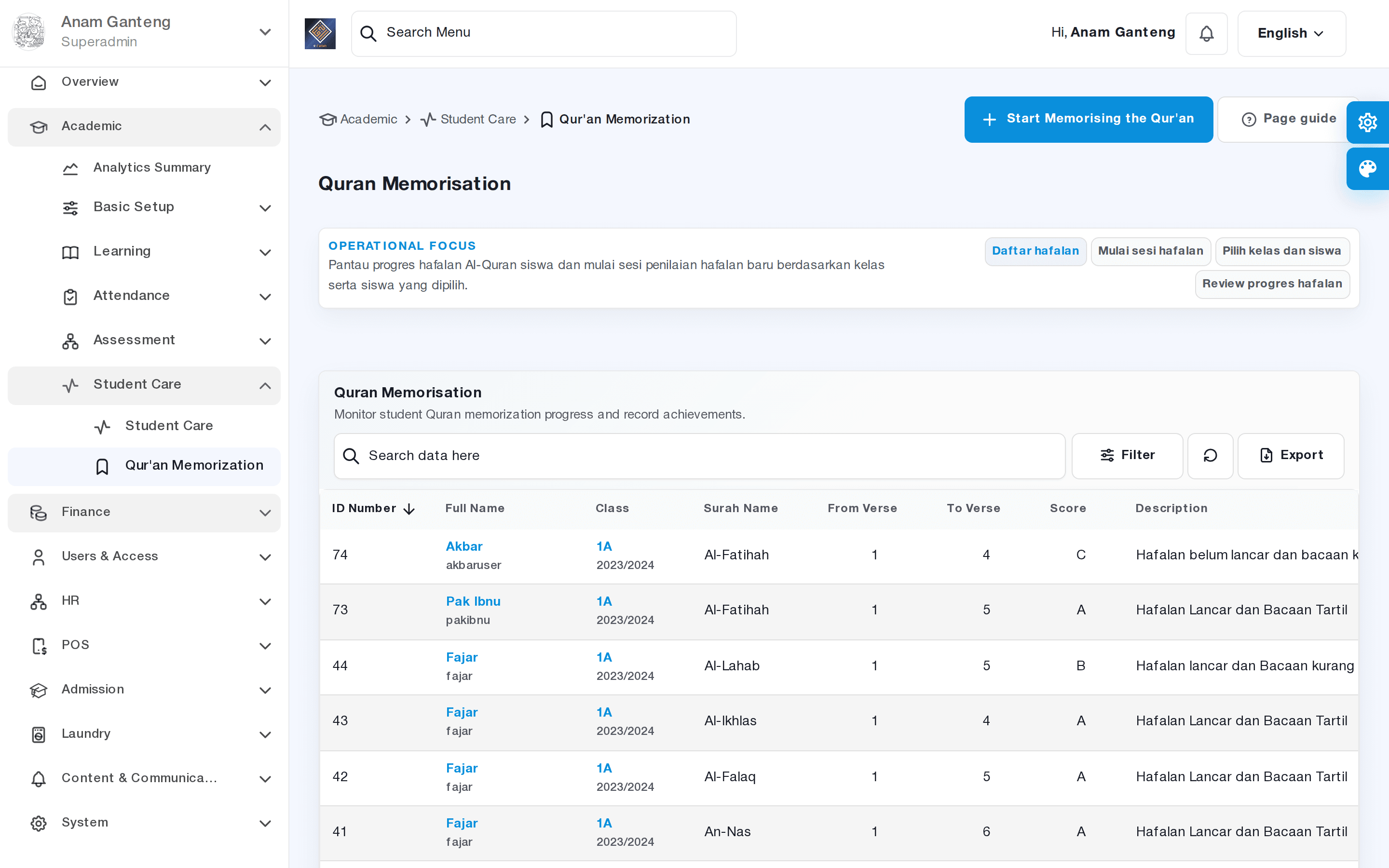
The Quran Memorization module is used to record student recitation submissions periodically. Each time a student recites, the supervisor logs the achievement so that accumulated memorization (juz, surah, down to pages/verses) is tracked automatically over time.
- Open the Quran Memorization menu at /admin/quran-memorisation.
- Select the student who is reciting, or search by class/halaqah to speed up the lookup.
- Add a new submission record: specify the surah, start–end verses, or the page/juz recited in that session.
- Choose the submission type, such as ziyadah (new memorization) or muraja'ah (review), so the recap distinguishes new progress from repetition.
- Rate the memorization quality (for example, fluent, needs tajwid correction, or must repeat) and add supervisor notes if needed.
- Save. The student's total accumulated memorization updates and can be viewed anytime on their memorization profile.
Monitoring achievement and memorization recaps
Beyond daily input, the Tahfidz module presents achievement recaps per student and per class. These recaps help the coordinator see who has reached their juz target and who is falling behind, so guidance can be more targeted.
- View the total juz/pages each student has memorized along with their last submission date.
- Compare progress among students in the same halaqah to evaluate a supervisor's method.
- Export the memorization recap as material for reports to pesantren leadership and to parents.
Managing Student Guidance through Student Care
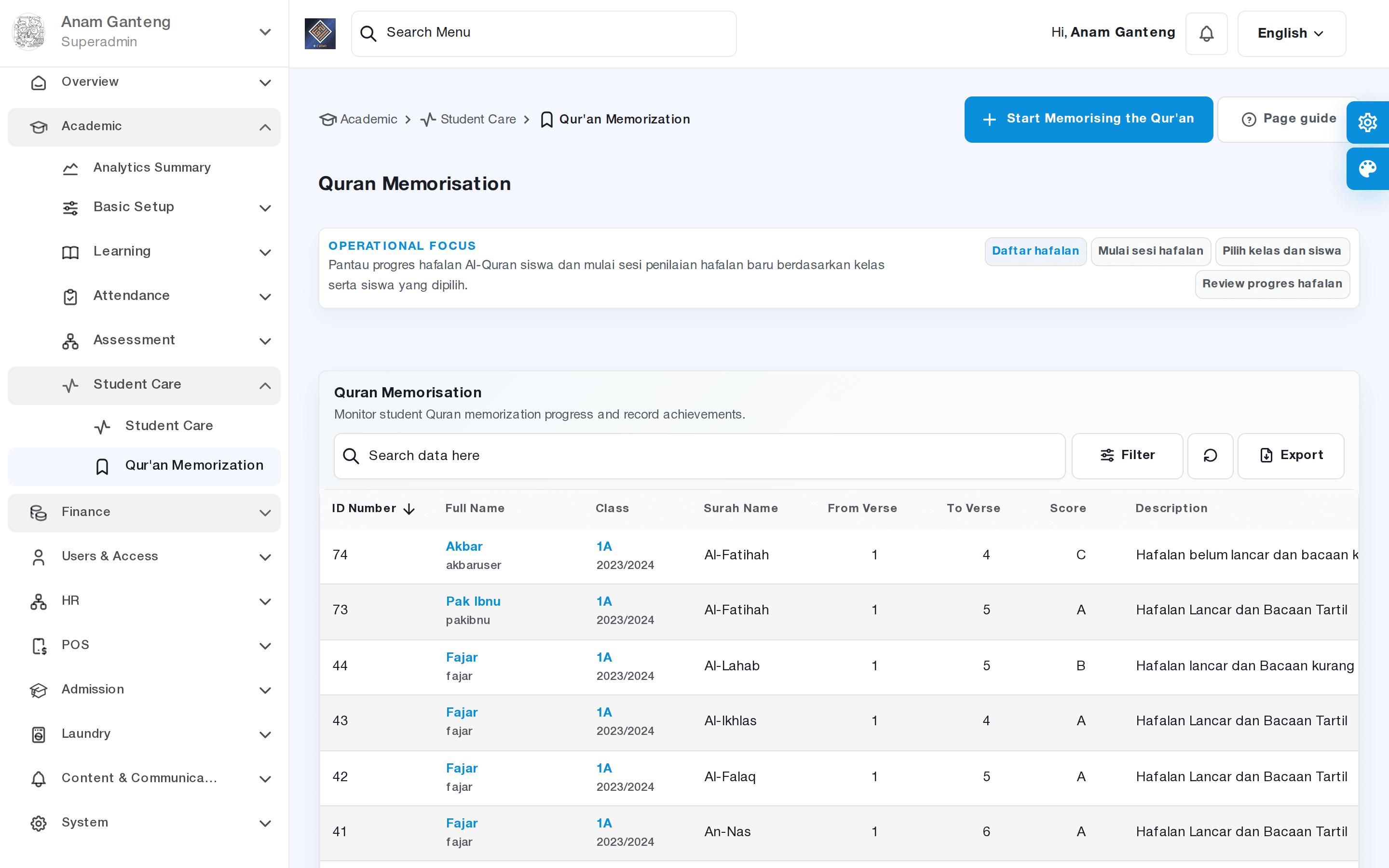
The Student Care module is the hub for non-academic student guidance. Here the student affairs team records violations and their points, manages permits and exit passes, and stores health records. As a result, a student's entire guidance history is gathered in one place.
Recording violations and student points
- Open the Student Care menu at /admin/student-care.
- Select the relevant student, then create a new violation record.
- Choose the violation type from the list (for example, late for prayer, breaking dormitory rules) — each type usually already carries a point weight.
- Fill in the incident date, description, and the officer/supervisor who recorded it.
- Save. Violation points accumulate on the student's profile as the basis for progressive guidance.
Accumulated points make it easy for the pesantren to apply staged guidance, such as a warning, a call to parents, or further action per the rules. Recording violations is often related to daily activity or worship attendance managed in the attendance module.
Managing permits and exit passes
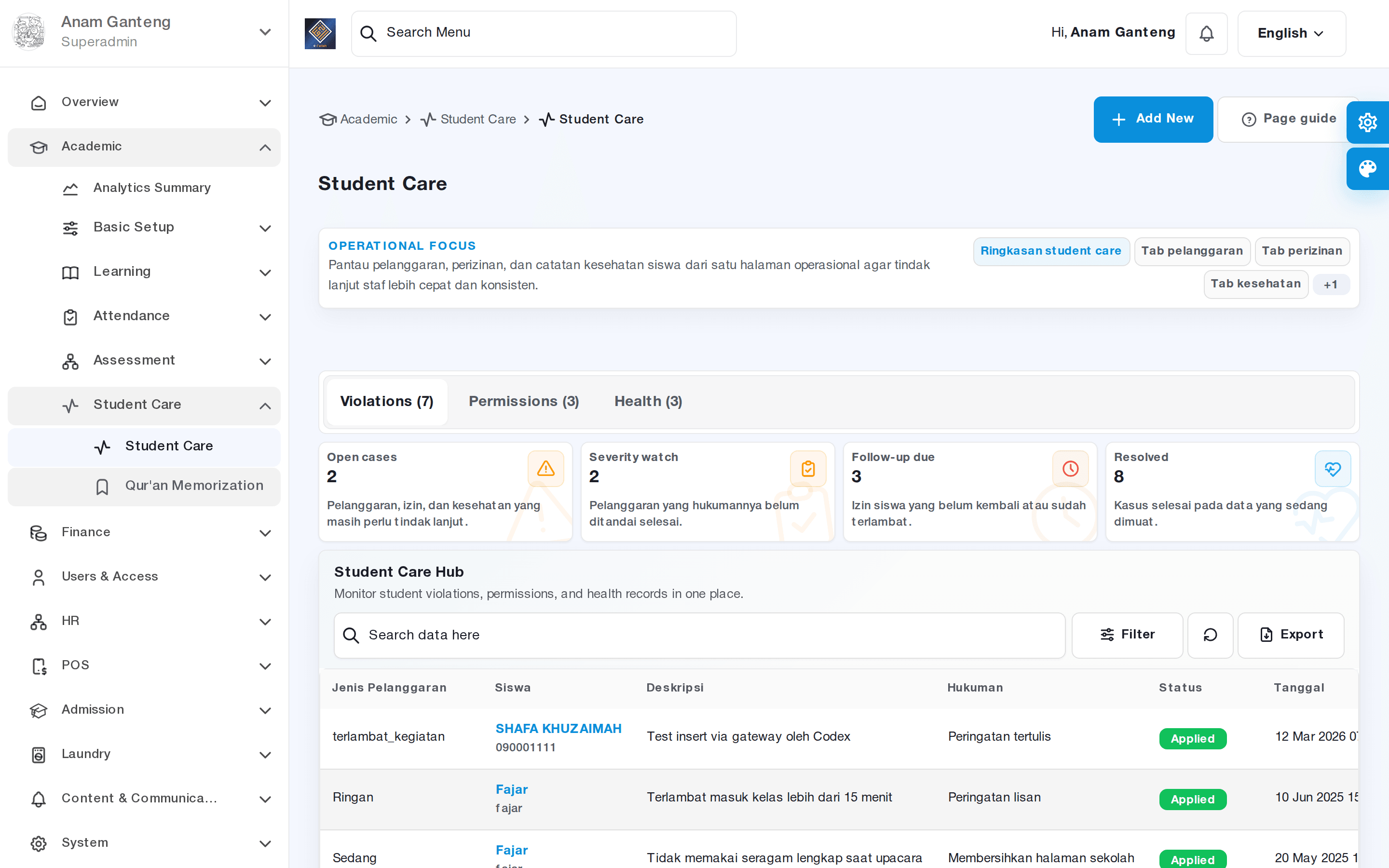
Student Care also handles student permits, from home leave and sick leave to permission to leave the pesantren grounds. The digital flow ensures every permit is recorded, approved by an authorized party, and easy to trace.
- In the Student Care menu, open the permits section and create a new permit request for the relevant student.
- Specify the permit type, departure and planned return dates, the reason, and the person in charge (parent/pick-up).
- Have an authorized officer process the approval; the permit status changes from submitted to approved or rejected.
- When the student returns, mark the permit as completed so the permit history stays accurate.
Storing health records
For the health aspect, Student Care allows recording of illness history, visits to the clinic/infirmary, and the treatment given. These records are important for student safety and as a reference if complaints recur.
- Record the complaint, initial diagnosis, treatment, and medication given for each incident.
- Keep the history so health officers can see patterns in a student's complaints over time.
- Use the records as a basis for communicating with parents if medical follow-up is needed.
Getting an Overview via Learning Analytics
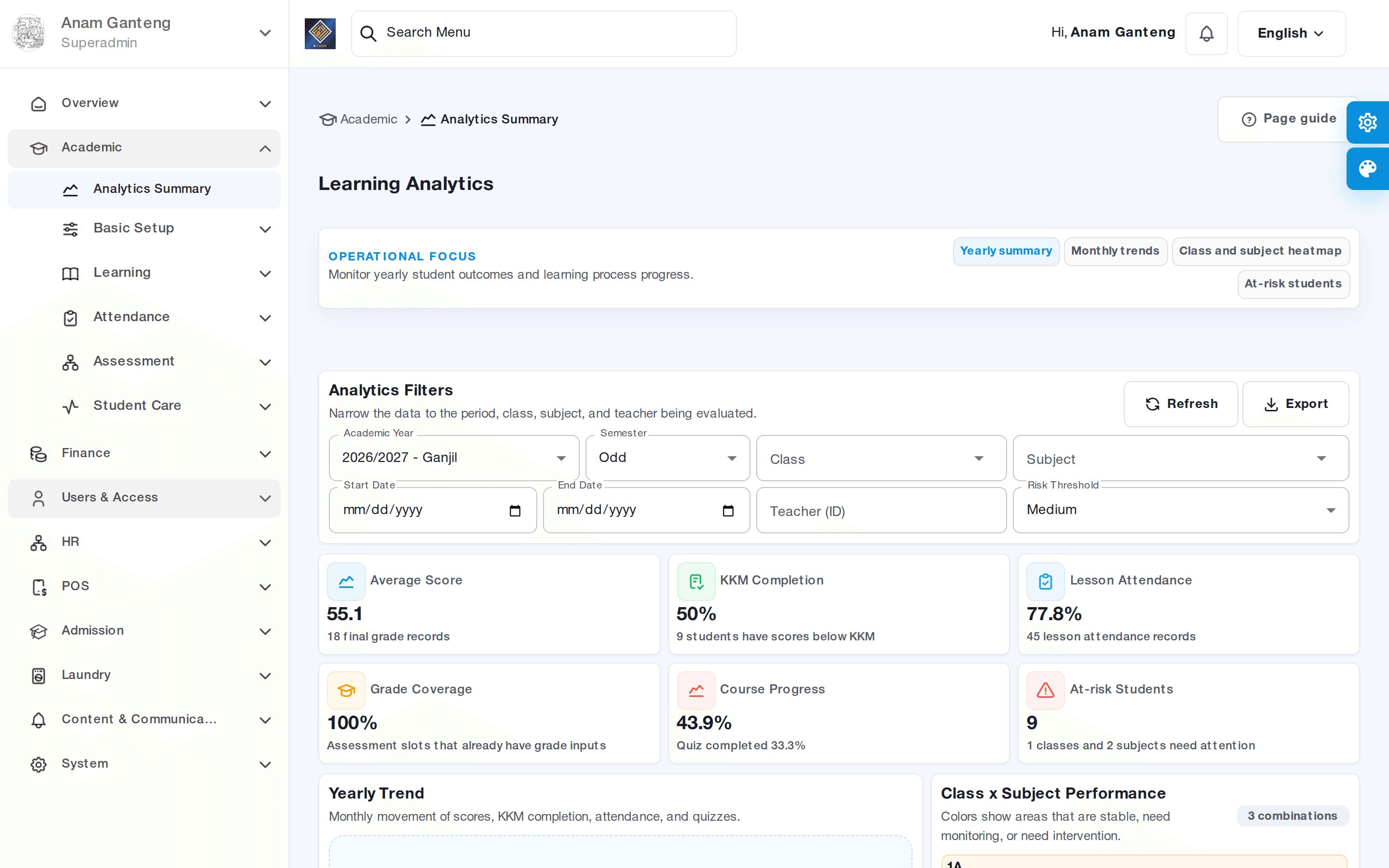
To gain a comprehensive picture of student development, use the Learning Analytics menu at /admin/academic/learning-analytics. This page summarizes guidance and learning indicators so pesantren leadership can make data-driven decisions rather than relying on impressions.
- Open Learning Analytics to view an aggregate summary of student achievement.
- Review trends, such as memorization progress or violation frequency, per class or per period.
- Use these insights to design guidance programs and identify students who need special attention.
Tips & Best Practices
- Encourage supervisors to record memorization submissions immediately after each session so data stays accurate and does not pile up at the weekend.
- Agree on a clear and fair violation-point scheme at the start of the semester, then communicate it to the students.
- Use submission-type labels (ziyadah/muraja'ah) consistently so progress recaps are easy to read.
- Review memorization recaps and violation points regularly, for example weekly, for responsive guidance.
- Fill in health records as thoroughly as possible; detailed information greatly helps in emergencies.
Troubleshooting
- A student does not appear when entering a submission. Make sure the student is registered and placed in a class/halaqah in the active academic year.
- Violation points do not increase. Check whether the chosen violation type has a point weight; records without a weight do not add to the total.
- A supervisor cannot enter submissions. Verify the supervisor account's access to the Quran Memorization menu.
- A permit status does not change. The permit is awaiting approval; make sure an authorized officer has processed the request.
- The recap looks empty. Adjust the period/class filter; the data may fall within a different date range.
FAQ
Can parents see memorization progress?
The memorization recap recorded in the Tahfidz module can serve as the basis for reports to parents. Some information can be shared via the parent app or through reports exported by the admin, depending on the pesantren's configuration.
What is the difference between new memorization and muraja'ah in the records?
New memorization (ziyadah) adds to the total achievement, while muraja'ah is review to maintain memorization. Distinguishing the two helps evaluate the quality and consistency of a student's memorization.
How do violations relate to attendance?
Violations such as missing worship or activities often stem from daily activity attendance data. For that reason, Student Care records should be aligned with the student activity attendance module.
Are health records confidential?
Health records should only be accessible to authorized officers. Configure access rights so a student's sensitive information is protected and seen only by relevant parties.
Are Student Care and Tahfidz built-in features?
The Tahfidz and Student Care modules are pesantren-specific features in Aerish. Availability of some guidance features may depend on your institution's package and configuration.
Related menus in the app
- Quran Memorization — record submissions and monitor each student's accumulated Quran memorization.
- Student Care — manage violations and points, permits/exit passes, and student health records.
- Learning Analytics — view a summary of guidance indicators and student learning progress.